> For the complete documentation index, see [llms.txt](https://docs.simicart.com/llms.txt). Markdown versions of documentation pages are available by appending `.md` to page URLs; this page is available as [Markdown](https://docs.simicart.com/features/subscription-and-marketing/meta-sdk-integration.md).
# Meta SDK integration
## 🎯 Why integrate with Meta SDK
If you want to sell more through your mobile app and consistently increase app installs, integrating the Meta SDK into your app is a critical step. Through its ads and monetization products, you can create campaigns on the Meta platform to drive app installs and further measure, optimize, and target your ads via app events tracking.
You can learn more about [app ads](https://developers.facebook.com/social-technologies/app-ads/) and [app events tracking](https://developers.facebook.com/docs/app-events/).
## 📌 Prerequisite
✅ **Before proceeding, make sure:**
* You are on the SimiCart Pro plan
* Your mobile app is published on the App Store and/or Google Play
* You have a verified Meta Business Suite account, along with an active Meta ad account
* You have a verified Meta developer account (or [sign up](https://developers.facebook.com/micro_site/url/?click_creative_path\[0]=button\&ums_creative_detail=primaryButtonHasBeenClicked%26device_type%3Ddesktop\&click_from_context_menu=true\&country=VN\&destination=https%3A%2F%2Fbusiness.facebook.com%2Fbusiness%2Floginpage%2F%3Fnext%3Dhttps%253A%252F%252Fdevelopers.facebook.com%252F%253Fnav_ref%253Dbiz_unified_f3_login_page_to_dfc%26app%3D436761779744620%26login_options\[0]%3DFB%26login_options\[1]%3DSSO%26is_work_accounts%3D1%26config_ref%3Dbiz_login_tool_flavor_dfc\&event_type=click\&last_nav_impression_id=04W1Prlhe2ExyhlHy\&max_percent_page_viewed=35\&max_viewport_height_px=923\&max_viewport_width_px=1470\&orig_http_referrer=https%3A%2F%2Fdevelopers.facebook.com%2Fsocial-technologies%2Fproducts%2F\&orig_request_uri=https%3A%2F%2Fdevelopers.facebook.com%2Fsocial-technologies%2Fapp-ads%2F\®ion=apac\&scrolled=true\&session_id=1xs5o943Bday17PiN\&site=developers\&extra_data\[create_type]=primaryButtonHasBeenClicked\&extra_data\[create_type_detail]=\&extra_data\[creative_detail]=primaryButtonHasBeenClicked%26device_type%3Ddesktop))
## ⚙️ **How to set up**
## 1. Create a Meta app
* From your Meta Business Suite account, navigate to Settings > Apps to create a Meta app.
{% @arcade/embed url="" flowId="i9q8ftnPqeN19XROOHbH" %}
## Invite SimiCart to your Meta app as Administrator
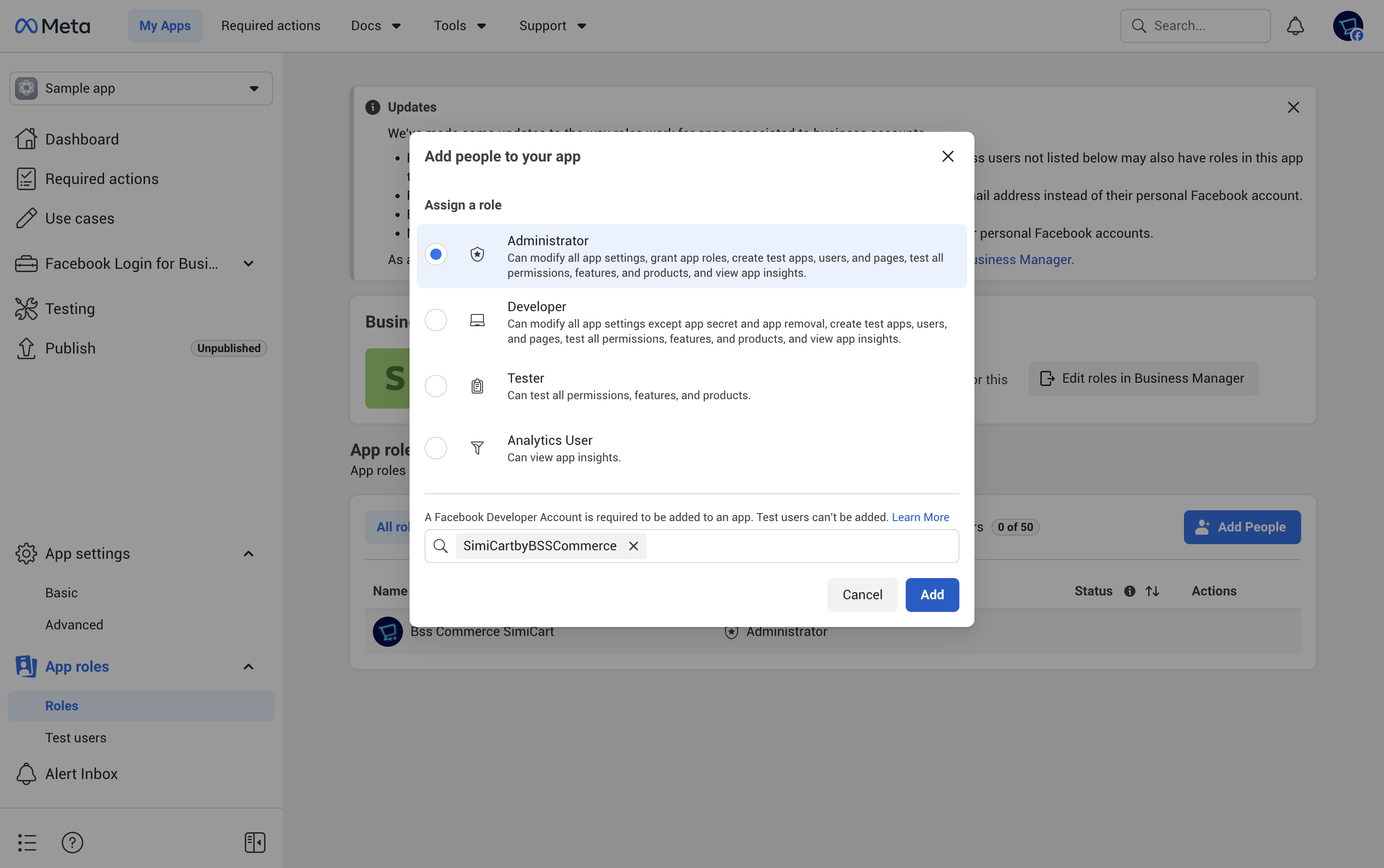
* From the Dashboard of the app you created, navigate to App roles > Roles.
* Click **Add People**, then choose **Administrator** and paste **SimiCartbyBSSCommerce** in the invitee field. Click **Add** to complete.
* After that, our team will receive an invitation to join your Meta app.
## Request to publish
Once you've completed the above steps, navigate to the SimiCart app's Publish tab and send us a request to publish. Our team will proceed to support you in integrating the Meta SDK on your behalf.