# B2B registration form | BSS B2B & Wholesale Solution integration

<figure><img src="https://4116947012-files.gitbook.io/~/files/v0/b/gitbook-x-prod.appspot.com/o/spaces%2FZvOReVnJPMF91ppETQNN%2Fuploads%2Fgit-blob-6cd9993721a665331acfe87939cc63c28b19d26b%2Fimage%20(331).png?alt=media" alt=""><figcaption></figcaption></figure>

## 🎯 Why use B2B registration form | BSS B2B & Wholesale Solution integration

If you are a B2B Shopify merchant, this feature lets you **seamlessly integrate BSS B2B Solution with your mobile app**, so the same registration forms from your Shopify online store also appear in the app — no extra setup needed!

<table><thead><tr><th width="228.6015625">Merchant Goal</th><th>How This Feature Helps</th></tr></thead><tbody><tr><td>Onboard B2B clients anytime, anywhere</td><td>Allows wholesalers to register via the app during travel or off-hours, without needing to open their computers, thereby enticing sign-ups.</td></tr><tr><td>Reach mobile-first customers</td><td>Offers a seamless, app-native form experience, appealing to clients who prefer mobile interactions</td></tr><tr><td>Keep consistency across platforms</td><td>Show the same form on both web and mobile for a unified customer experience</td></tr></tbody></table>

## 📌 Prerequisite <a href="#prerequisite" id="prerequisite"></a>

Before proceeding, make sure:

* You are in the SimiCart Premium plan
* You have installed the [<mark style="color:purple;">**BSS B2B & Wholesale Solution**</mark>](https://apps.shopify.com/b2b-solution-custom-pricing?search_id=82ee2a26-939a-48dd-b76f-855ca9d2f4d2\&surface_detail=b2b+solution\&surface_inter_position=1\&surface_intra_position=6\&surface_type=search) app on your Shopify store. Then, in the app:
  * You have turned on Registration forms

    <figure><img src="https://4116947012-files.gitbook.io/~/files/v0/b/gitbook-x-prod.appspot.com/o/spaces%2FZvOReVnJPMF91ppETQNN%2Fuploads%2Fgit-blob-c1a41983d22be0172ac80cdc8a8697be7e0b66ee%2Fimage%20(336).png?alt=media" alt=""><figcaption></figcaption></figure>
  * The form you want to display on the mobile app is enabled and saved

    <figure><img src="https://4116947012-files.gitbook.io/~/files/v0/b/gitbook-x-prod.appspot.com/o/spaces%2FZvOReVnJPMF91ppETQNN%2Fuploads%2Fgit-blob-bc93e6742bf1f909171ae67c85a92a739f1b36a1%2Fimage%20(332).png?alt=media" alt=""><figcaption></figcaption></figure>

## ⚙️ How to set up

### 1. Turn on Public API in BSS B2B Solution

* From the BSS B2B Solution admin dashboard, navigate to **Public API**. Then, if necessary, click **Enable** to turn it on for potential connection with other applications.

  <div data-full-width="true"><figure><img src="https://4116947012-files.gitbook.io/~/files/v0/b/gitbook-x-prod.appspot.com/o/spaces%2FZvOReVnJPMF91ppETQNN%2Fuploads%2Fgit-blob-172471740cd1ae43d057d04189929247e0ceab1d%2Fimage%20(333).png?alt=media" alt=""><figcaption></figcaption></figure></div>
* Next, copy the **API Key** and save it for later use

  <figure><img src="https://4116947012-files.gitbook.io/~/files/v0/b/gitbook-x-prod.appspot.com/o/spaces%2FZvOReVnJPMF91ppETQNN%2Fuploads%2Fgit-blob-d5c89fd6d301849e26d245a5d42aeb0a7c7383b4%2Fimage%20(334).png?alt=media" alt=""><figcaption></figcaption></figure>

### 2. Get the Form ID

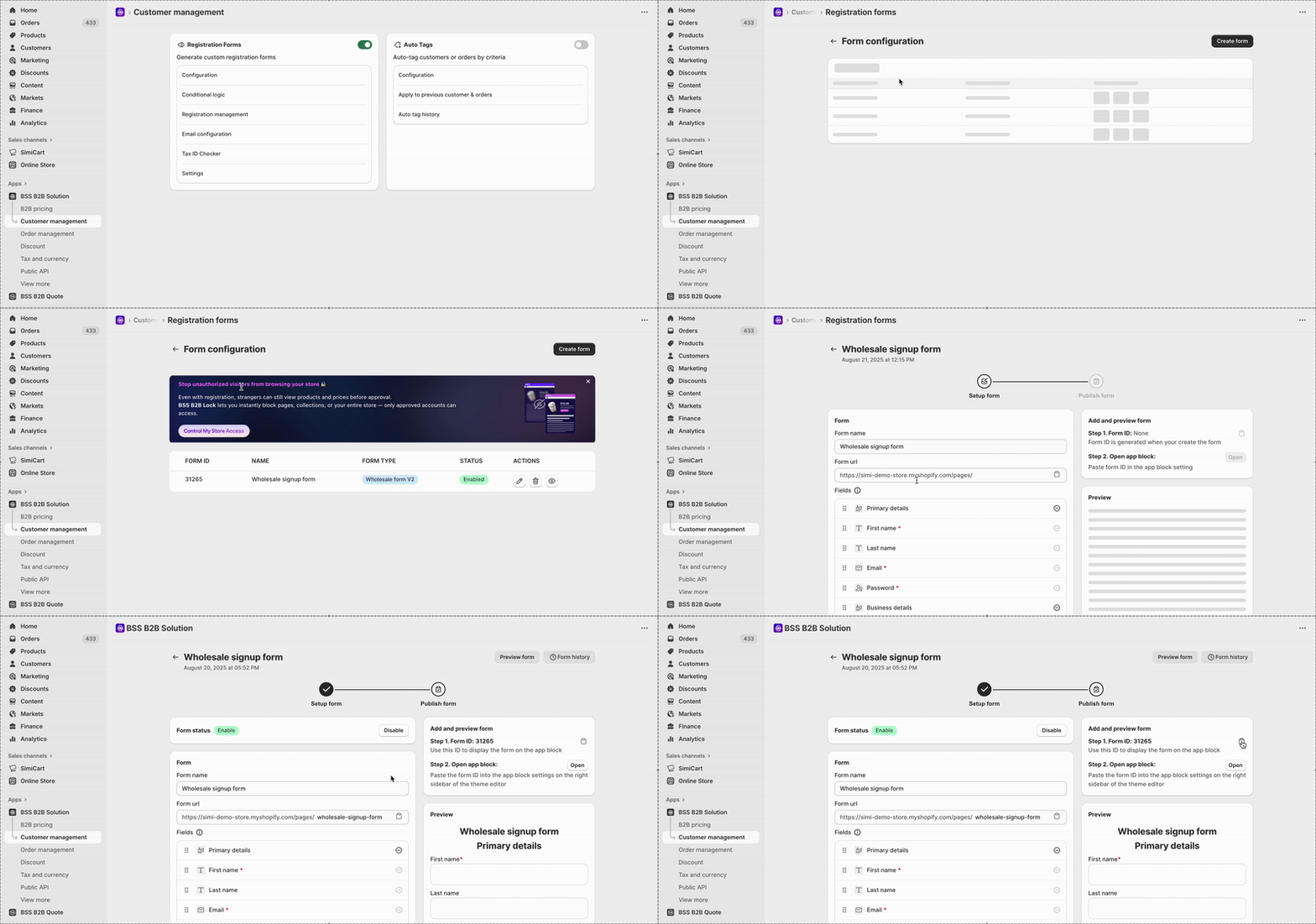
* Navigate to **Customer management** tab > **Registration Forms** > **Configuration**. Then, choose the form you would like to display in the mobile app and copy its Form ID.

  <figure><img src="https://4116947012-files.gitbook.io/~/files/v0/b/gitbook-x-prod.appspot.com/o/spaces%2FZvOReVnJPMF91ppETQNN%2Fuploads%2Fgit-blob-4e0332f27f4437fbefd024865276ba362831a6a5%2FChange%20GIF%20Loop%20Count.gif?alt=media" alt=""><figcaption></figcaption></figure>

### 3. Enable the integration with SimiCart

* Now, from the SimiCart Mobile App Builder admin dashboard, navigate to **Features** and find **B2B registration form | BSS B2B & Wholesale Solution integration.** Click **Configure.**

  <figure><img src="https://4116947012-files.gitbook.io/~/files/v0/b/gitbook-x-prod.appspot.com/o/spaces%2FZvOReVnJPMF91ppETQNN%2Fuploads%2Fgit-blob-ff494af30d565c47a9e579383c2a0b3d705a0bbc%2Fimage%20(339).png?alt=media" alt=""><figcaption></figcaption></figure>
* Paste the **Form ID** and the **API key**. Then, click on **Check connection.** Once successful, toggle **Enable** to make it active.

  <figure><img src="https://4116947012-files.gitbook.io/~/files/v0/b/gitbook-x-prod.appspot.com/o/spaces%2FZvOReVnJPMF91ppETQNN%2Fuploads%2Fgit-blob-6a0f9cdb7609c64671057d9c76620a174232f03c%2Fimage%20(340).png?alt=media" alt=""><figcaption></figcaption></figure>
* Click **Save**