> For the complete documentation index, see [llms.txt](https://docs.simicart.com/llms.txt). Markdown versions of documentation pages are available by appending `.md` to page URLs; this page is available as [Markdown](https://docs.simicart.com/features/driving-store-purchase/product-reviews-or-judge.me-integration.md).
# Product Reviews | Judge.me integration
Encourage users to make purchases with verified reviews from fellow users.
## 🎯 Why use Product Reviews | Judge.me integration
This feature lets you **seamlessly integrate Judge.me with your mobile app**, so the same product reviews and star ratings from your Shopify store also appear in the app — no extra setup needed!
| **Merchant Goal** | **How This Feature Helps** |
| --------------------------------------- | --------------------------------------------------------------------------------- |
| 🌟 Build trust with social proof | Display verified reviews and star ratings to boost buyer confidence |
| 🔁 Keep consistency across platforms | Show the same reviews on both web and mobile for a unified customer experience |
| ⏱️ Automate review collection & display | Judge.me automatically requests and publishes reviews — no manual effort required |
| 📈 Increase mobile conversions | Positive reviews help convince users to purchase directly from the app |
## 📌 Prerequisite
✅ **Before proceeding, make sure:**
You have installed the [**Judge.me**](https://apps.shopify.com/judgeme) app on your Shopify store.
## ⚙️How to set up
### 1. Get the private token
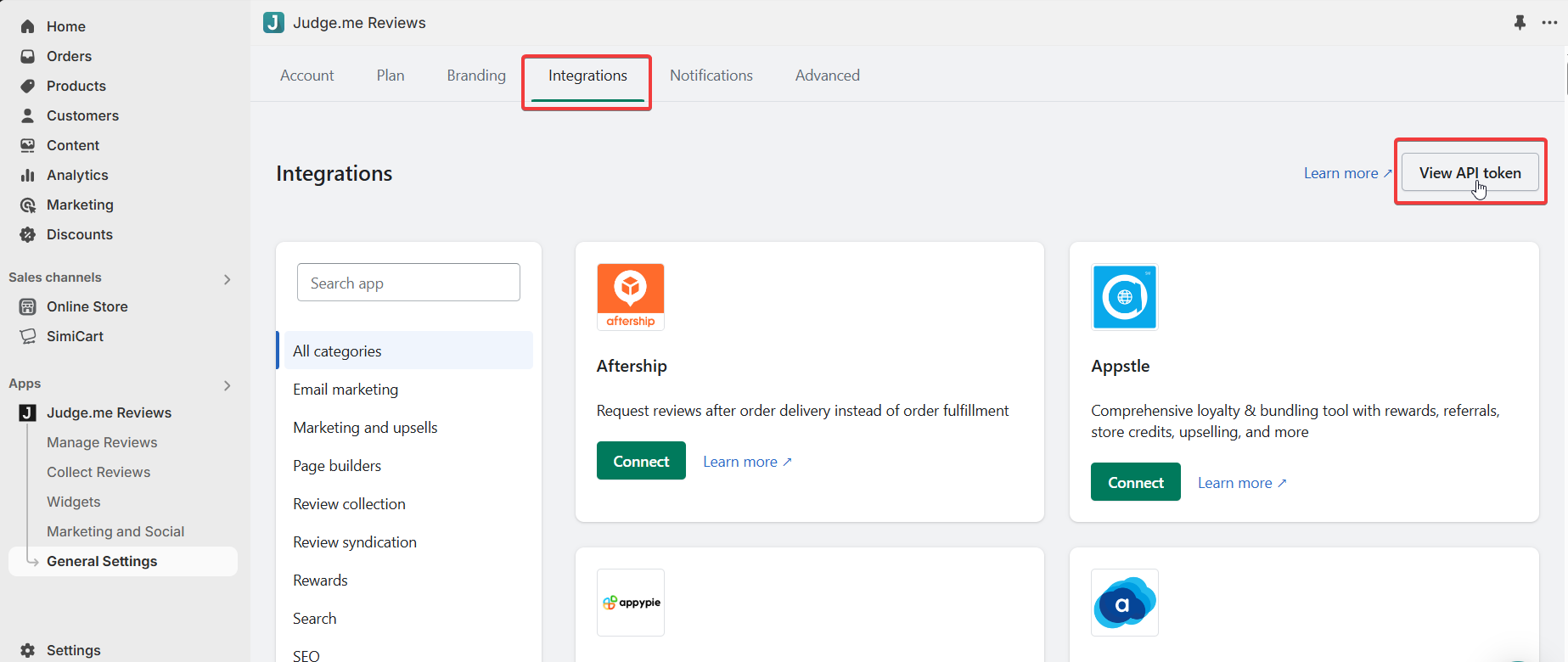
From the Judge.me admin dashboard, navigate to **General Settings > Integrations > View API token**. Then, copy the **Private API token** provided.
Copy Private API token.
### 2. Enable the integration
Now, from SimiCart Mobile App Builder admin dashboard, navigate to **Features** > **Product reviews | Judge.me integration.** Click **Activate.**
In Product reviews | Judge.me integration section, click Activate.
Paste the previously copied **Private API token** into **API token** field then click on **Check connection**. You have integrated Judge.me into your app successfully!
***
Need help during the process? Reach out to the **SimiCart support team** via live chat or our email address at . We're here to make your mobile setup experience as smart and seamless as possible!
.png?alt=media)
.png?alt=media)
.png?alt=media)
.png?alt=media)